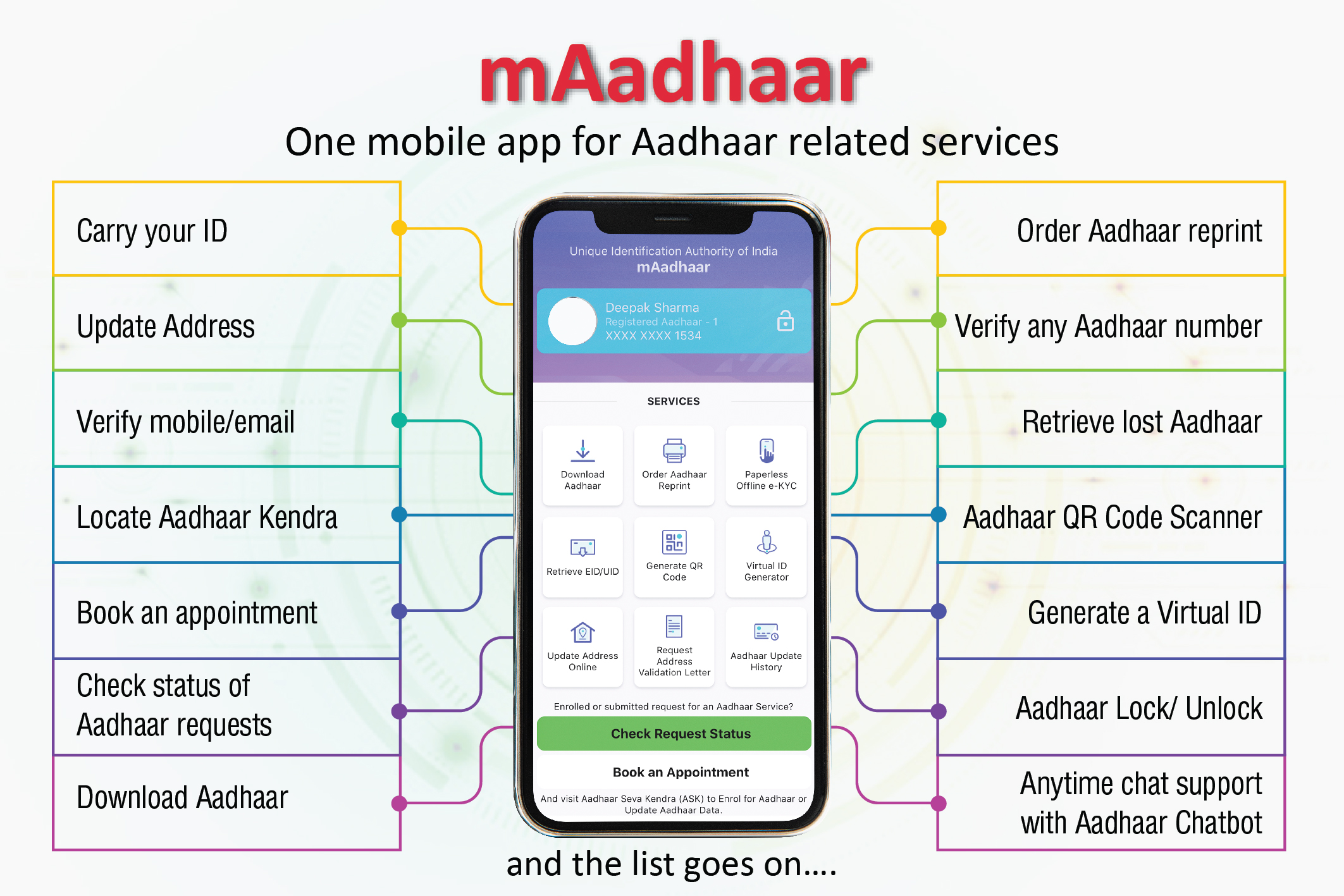
In today’s digital India, Aadhaar has become one of the most important identity documents for citizens. From opening bank accounts to applying for government schemes, mobile SIM verification, PAN linking, and online services — Aadhaar is required almost everywhere.
Earlier, updating Aadhaar details meant visiting an Aadhaar Enrollment Center and waiting in long queues. But now, things have become much easier with the mAadhaar App 2026.
The official mAadhaar mobile application allows users to manage and update Aadhaar-related information directly from home using their smartphones.
In this detailed guide, you will learn everything about the mAadhaar App — features, download process, Aadhaar update steps, benefits, security features, and complete usage instructions.
What is the mAadhaar App?
The mAadhaar App is the official mobile application developed by the Unique Identification Authority of India (UIDAI).
It enables Aadhaar holders to carry their Aadhaar digitally and access multiple Aadhaar services without visiting physical centers.
Using this app, users can:
- Download digital Aadhaar
- Update certain Aadhaar details
- Lock or unlock Aadhaar number
- Share Aadhaar securely
- Check update status
- Locate Aadhaar centers
Simply put, your smartphone becomes your digital Aadhaar card.
Why mAadhaar App is Important in 2026
As government services move online, digital identity management has become essential.
Key Reasons for Using mAadhaar
✅ No need to carry physical Aadhaar card
✅ Update information from home
✅ Faster verification process
✅ Secure digital identity access
✅ Useful during travel and online KYC
The app supports India’s Digital Governance initiative by simplifying citizen services.
Main Features of mAadhaar App 2026
1. Digital Aadhaar on Mobile
Users can download and store Aadhaar securely inside the app.
2. Update Aadhaar Details
Certain details can be updated online without visiting centers.
3. Aadhaar Lock/Unlock Facility
Protect your Aadhaar from misuse instantly.
4. Offline e-KYC Sharing
Share identity securely using QR code or offline verification.
5. Family Aadhaar Management
Add multiple Aadhaar profiles within one app.
6. Locate Enrollment Centers
Find nearby Aadhaar centers easily.
How to Download mAadhaar App in 2026
The application is available for both Android and iPhone users.
For Android Users
- Open Google Play Store
- Search mAadhaar
- Verify developer as UIDAI
- Tap Install
For iPhone Users
- Open Apple App Store
- Search mAadhaar App
- Install official UIDAI application
Always download only the official version to avoid fraud apps.
How to Register in mAadhaar App
After installation, follow these steps:
Step 1: Open the App
Launch the application on your phone.
Step 2: Create Password
Set a secure app password.
Step 3: Add Aadhaar Profile
Enter:
- Aadhaar number
- Captcha code
Step 4: OTP Verification
Enter OTP received on registered mobile number.
Your Aadhaar profile will be successfully added.
How to Update Aadhaar Details from Home Using mAadhaar
One of the biggest advantages of the app is updating Aadhaar details remotely.
Details That Can Be Updated Online
- Address
- Mobile number request
- Email ID
- Supporting documents
(Note: Biometric updates still require center visit.)
Step-by-Step Aadhaar Address Update Process
Step 1
Open mAadhaar App and login.
Step 2
Select Update Aadhaar Online option.
Step 3
Choose Address Update.
Step 4
Enter new address details correctly.
Step 5
Upload valid address proof such as:
- Electricity bill
- Bank statement
- Passport
- Rent agreement
Step 6
Submit request and confirm using OTP.
You will receive an Update Request Number (URN).
How to Check Aadhaar Update Status
Users can track update progress easily.
Steps:
- Open mAadhaar App
- Select Check Update Status
- Enter URN number
Status will show:
- Under Review
- Approved
- Rejected
Lock and Unlock Aadhaar Feature
Security is one of the strongest features of the app.
Why Lock Aadhaar?
Prevents unauthorized biometric usage.
Steps to Lock Aadhaar
- Login to app
- Select Aadhaar Lock option
- Confirm using OTP
You can unlock anytime when authentication is required.
Share Aadhaar Securely Using QR Code
Instead of sharing photocopies, users can share Aadhaar digitally.
The app generates:
✅ Secure QR code
✅ Masked Aadhaar
✅ Offline e-KYC file
This protects sensitive information.
Benefits of Using mAadhaar App
Convenience
Most Aadhaar services available from home.
Time Saving
No need to visit enrollment centers frequently.
Secure Identity Management
Data protected with password and OTP verification.
Digital Accessibility
Useful during travel, banking, and verification.
Important Security Tips
While using mAadhaar App:
✔ Never share OTP
✔ Use screen lock on phone
✔ Download only official app
✔ Avoid public Wi-Fi during login
✔ Enable Aadhaar lock when not in use
Common Problems and Solutions
OTP Not Received
Ensure registered mobile number is active.
Profile Not Adding
Check Aadhaar number carefully.
Update Rejected
Upload clear and valid documents.
Who Should Use mAadhaar App?
The app is useful for:
- Students
- Working professionals
- Senior citizens
- Government scheme applicants
- Travelers
- Banking users
Basically, every Aadhaar holder can benefit from it.
Is mAadhaar App Safe?
Yes. The app is developed by UIDAI and uses strong encryption and authentication methods.
Security includes:
- Password protection
- OTP verification
- Device binding
- Encrypted data storage
Your Aadhaar information remains secure.
Frequently Asked Questions (FAQs)
Is mAadhaar App free?
Yes, it is completely free to use.
Can I update mobile number through the app?
Mobile number updates usually require biometric verification at centers.
Can multiple Aadhaar profiles be added?
Yes, family profiles can be managed.
Is digital Aadhaar valid everywhere?
Yes, digital Aadhaar is legally valid across India.
Do I need internet every time?
Internet is required for updates but offline Aadhaar access is available.
Final Conclusion
The mAadhaar App 2026 has made Aadhaar management faster, safer, and more convenient than ever before. Citizens can now update details, access digital Aadhaar, and manage identity verification directly from their homes.
With increasing digital services across India, installing and using the mAadhaar app ensures that your identity information remains updated and easily accessible whenever required.
If you haven’t installed it yet, downloading the mAadhaar app can simplify many everyday verification and documentation tasks.